
Here we go again.
Another post about GMail... Guess what their support told me?? DNS! Wait 48 hours!
Guess what? It was working... Google had broken it and made me reset DNS TXT Records that were put in place in 2022!
Yes, I reset all my DKIM Keys because Gemini said it was DNS! Did I believe her, no... Did I get hold of a Real Person? YES! Did he blame Google? No.... Did he blame DNS? YES!
So, what did I do with my evening, well, I rate limited https://mail-tester.com because... Well, I was testing! I tried https://mailgenius.com and they sent me email's...... Immediately do not use again!
Hey Gemini, Let's build a mail tester, I have..
1) Server
2) Domain
3) MX Record to subdomain.domain.uk
4) Catch All Record to an email address....
What do we build in an hour... I have a fully functional email testing system that tells me SPF, DKIM and DMARC!
Now, with that, I have the ability to test... I can run through several emails and try querky things!! So, what have I found?
It's NOT DNS!
It's actually Google's fault.
So, at Work, We use Google Workspace!
4 Domains connected. (Cover your bases... You would be surprised how many people accidentally send to the .co.uk instead of the .com!)
I've been having DKIM issues with one domain... It's got us blocked from Yahoo! As they want DKIM, which should be fine, I set it up in 2022! It's been fine...........
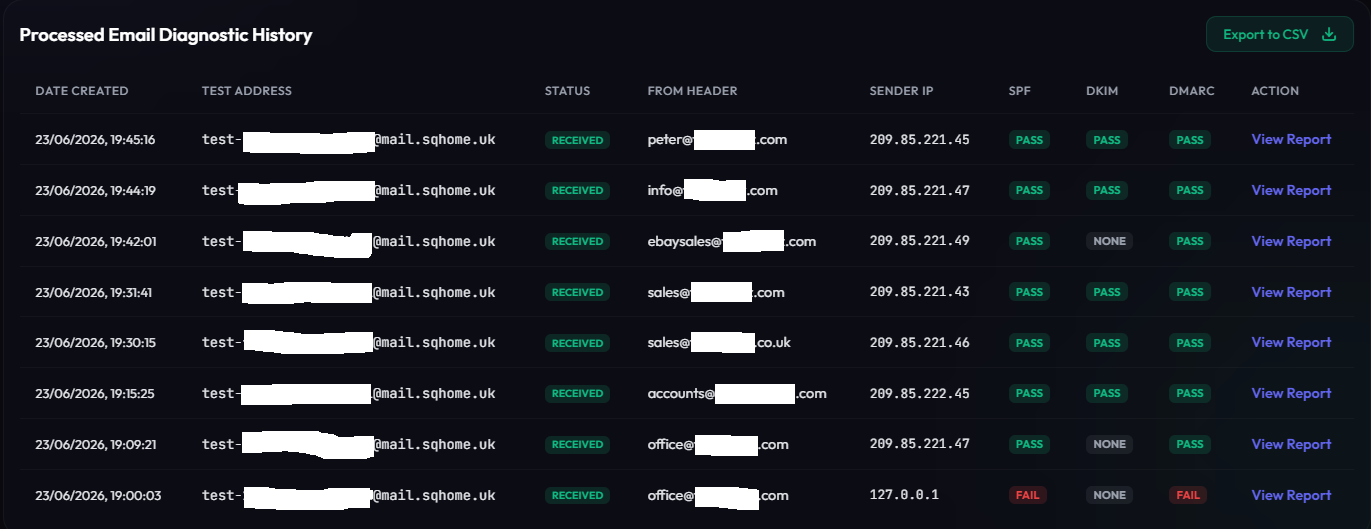
Ignore that first email.... Yeah, stupid thing thought Amavis was the sender...... Teething problems....
So..... Explain how this is DNS's fault?
Why does sales@domain.com Pass, yet ebaysales@domain.com.. Fail...... Why does office@domain.com fail, but peter@domain.com Pass.....
If that doesn't scream Google problem, I don't know what does?!
Let's see if the next person can help me... Instead of blaming it on DNS and telling me to wait for 48 Hours!!
19:39 Update!
They tried to blame DNS Again!!! No! Seriously!
"Google Workspace Support, Sandeep: Upon checking the details, DKIM record are split under two string we need to update that into one string.
Google Workspace Support, Sandeep: I am sharing you the steps to update DKIM record
Google Workspace Support, Sandeep: Here are the steps for adding DKIM Record (Email Authentication):
1.Generate DKIM Record in Google Workspace
a. Sign in to Google Admin Console (super administrator).
b. Go to Menu > Apps > Google Workspace > Gmail > Authenticate email."
I mean, really?!?!?
Google's internal tool showed it broken in two... Well, nobody else does!
"Not that I can see on MXToolbox. Plus, how does that explain why sales@footprintz is applying the DKIM...
Why are you always blaming someone else?
Google Workspace Support, Sandeep: Can you please help me with the screenshot of your DNS records page where it shows the DKIM value but before sharing the screen shot please make sure to hide and manage any sensitive data (such as account passwords, credit card details, government identification numbers, confidential business data, or other sensitive information)."
So, login to domain provider, go into domain management, find domain, go into DNS records.. proceed to copy and paste the entire length of the 2048 character key in Paint and upload it to him along with two email headers............
Now... To get to this point, Me and Gemini hacked together a Node.js (Not sure why she's obsessed with Node.js) Website. Create a sub.domain MX record on the domain and build my own mail tester because I got rate limited on mail-tester.com and mailgenius.com sent me emails!! I mean, who does that?! I just wanted to test the email server!!!!
Created an email address, set a catch-all on the email server and boom.. I had a blank canvas to have my own service. It does really help having my own setup, my own Postfix, and the fact is, I can just do this....!
"Please kindly look at these two text files and tell me it's DNS.
Google Workspace Support, Sandeep: Let me check
Google Workspace Support, Sandeep: Please allow me for 2-3 minutes to review the details.
Google Workspace Support, Sandeep: Thank you for your time and patience.
Google Workspace Support, Sandeep: Upon checking these headers the "DKIM-Signature" header for domain.com is completely missing. It only contains the fallback "X-Google-DKIM-Signature" from the internal google system.
Google Workspace Support, Sandeep: This happens because the system does not see ebaysales as an active or alias on your user panel, so it bypasses your domain's DKIM signing process.
Google Workspace Support, Sandeep: To fix this
Me: Ah! DNS Issue Indeed. So, let's fix this please.
Google Workspace Support, Sandeep: Yes, but in our internal tool as I think you have select the bit length as 2048 that is the reason it shows on our side as split into two parts."
So. The Solution!
"Google Workspace Support, Sandeep: Now to fix that if you add ebaysales@domain.com as an explicit alias in your Google Admin user panel right now, our servers will immediately start applying the correct DKIM key to all outgoing emails from this address."
Admin console > Directory > Users > Add alternate emails
Add them in there and boom, it works!!!!!
24 hours, DNS headache and it's in the Admin Console!
24/06/2026 16:26
Ah! So, Me and Gemini are no longer on speaking terms until 51 hours has passed!
I rush to get this bloody email tester https://testonemail.com which I'm setting up now, all my other projects are on hold until Friday 26th June 2026!
Thanks Google for once again, not trusting what your users are saying and blame it on DNS!